
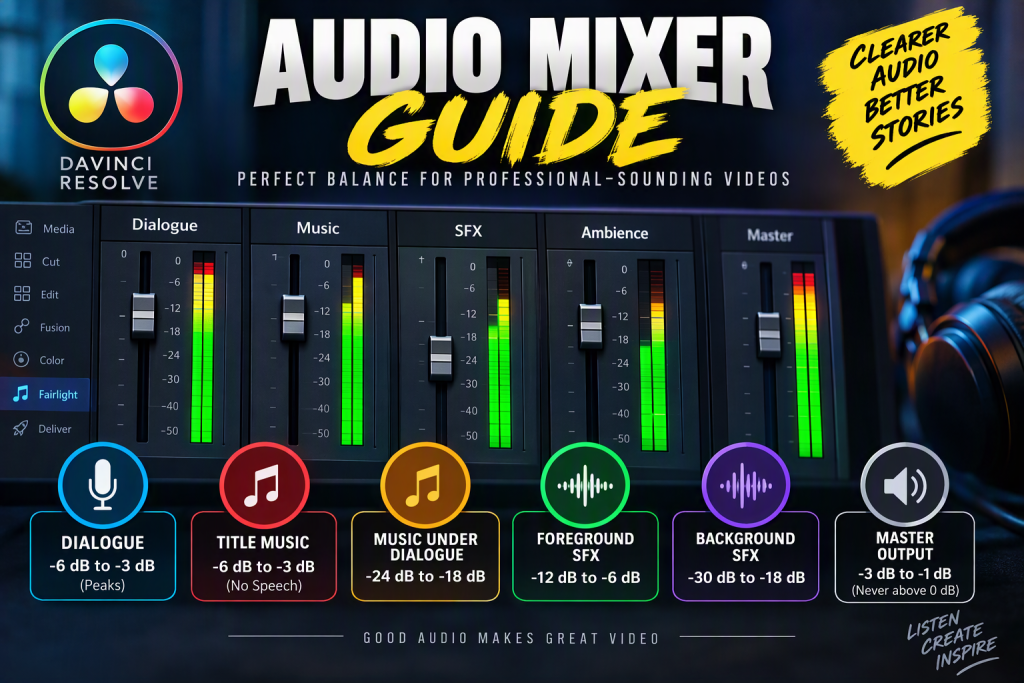
Audio Mixer Guide for YouTube Videos
This guide is designed for spoken videos, tutorials, documentaries, vlogs, and short films where dialogue is the most important element.
Understanding the Audio Meter Colours
The mixer meter shows how loud your audio is:
🟢 Green = Safe operating range
🟡 Yellow = Loud but usually acceptable
🔴 Red = Too loud, risk of clipping and distortion
Golden Rule
Try to keep:
- Most audio in the green
- Occasional peaks in the yellow
- Nothing important in the red
Recommended Audio Levels
1. Dialogue (Voiceover, Presenter, Interviews)
Most important audio in the project
Target
- Mostly upper green
- Occasional yellow peaks
- Never red
dB Guide
- Average speech: -18 dB to -12 dB
- Peaks: -6 dB to -3 dB
Visual Example
Green  ████████▓▓
Yellow ▓▓
Red
Check
You should understand every word effortlessly.
2. Intro / Title Music (No Speech)
When nobody is talking, music can be much louder.
Target
- Upper green
- Frequently into yellow
- Avoid red
dB Guide
- -6 dB to -3 dB peaks
Visual Example
Green  ████████▓▓
Yellow ▓▓▓
Red
3. Background Music Under Dialogue
Music should support, not compete with, the voice.
Target
- Middle green
dB Guide
- -24 dB to -18 dB
Visual Example
Green  ████
Yellow
Red
Check
If you need to concentrate to hear the speaker, lower the music.
4. Foreground Sound Effects
These are sounds the audience should notice.
Examples:
- Door slams
- Button presses
- Vehicle starts
- TARDIS controls
- Footsteps that are the focus of the scene
Target
- Upper green
- Occasional yellow
dB Guide
- -12 dB to -6 dB
Visual Example
Green  ███████
Yellow ▓▓
Red
5. Background Sound Effects
Atmosphere and ambience.
Examples:
- Wind
- Birds
- Engine hum
- Room ambience
- Distant traffic
Target
- Lower to middle green
dB Guide
- -30 dB to -18 dB
Visual Example
Green  ███
Yellow
Red
Check
You should miss them when muted but barely notice them when playing.
Mixing Priority Order
When several sounds play together:
| Priority | Audio Type |
|---|---|
| 1 | Dialogue |
| 2 | Foreground sound effects |
| 3 | Background music |
| 4 | Background ambience |
If two sounds compete, the higher-priority sound wins.
Example YouTube Mix
Imagine a Doctor Who-style scene:
| Audio Element | Peak Level |
|---|---|
| Dialogue | -6 dB |
| TARDIS lever sounds | -10 dB |
| TARDIS hum | -22 dB |
| Background music | -22 dB |
| Opening titles music | -4 dB |
| Master output | Maximum -1 dB |
Master Output
Watch the Master meter carefully.
Target
- Peaks between -3 dB and -1 dB
- Never exceed 0 dB
Visual Example
Green  ████████▓▓
Yellow ▓▓
Red
Touching red on the master bus is usually a sign to reduce levels.
The Eyes-Closed Test
A simple professional trick:
- Close your eyes.
- Listen to the finished video.
- Ask yourself:
- Can I hear every word clearly?
- Does the music support rather than compete?
- Do important sound effects stand out?
- Does nothing sound distorted?
If the answer is “yes” to all four, your mix is probably in a very good place.
Quick Reference Cheat Sheet
| Audio Type | Mixer Colour Target |
|---|---|
| Dialogue | Upper Green / Occasional Yellow |
| Intro Music | Upper Green / Yellow |
| Music Under Speech | Middle Green |
| Foreground Effects | Upper Green / Occasional Yellow |
| Background Effects | Lower-Middle Green |
| Master Output | Upper Green / Yellow, no Red |
Simple beginner formula: Keep the voice highest, sound effects slightly below, music comfortably lower, ambience lower still, and keep the master meter out of the red. This will give you a professional-sounding mix in most YouTube videos.
